Reminder FLEX & Photo BP android app official site
Celestial Brain -Mobile app developer-
  • Google Play Store
    • Reminder FLEX
    • Instart BP Tracker
  • Reminder FLEX FAQ
  • Photo BP FAQ
  • News & updates
  • Contact us
  • Reminder FLEX FAQ
  • Instant Blood Pressure Tracker FAQ
  • Google Play Store

Long tap text & select does’t work well

General
2023.07.05

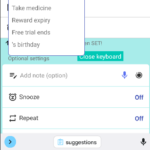
This is a workaround when you want to copy and paste by long pressing text, but you can not select it well.

・Press “Close Keyboard” to close the keyboard once.
・When keyboard is not showing, long press text. you should be able to choose.
General
TwitterFacebookはてブPocketLINEPinterest
Celestial Brain -Mobile app developer-

FAQ page

Reminder FLEX on Google Play Store

Related posts

General

I wrongly denied permission to saving backup. How can I allow?

When you backup Reminder FLEX data first time, Your device asked "Permission". And if selected "Deny", in that case you ...
General

How to stop optimizing Reminder FLEX on OPPO device to alarms go off realtime?

This is for OPPO phone/device user. If you've tried stop opimizing Reminder FLEX app with how to video, but you could...
General

Red/Yellow bell icon is appearing on the settings icon

This guide explains the causes and solutions for when a yellow or red bell icon appears on the Settings icon. If...
General

Category feature? Yes, there is!

We often receive requests for category or group organization, and in Reminder FLEX, you can organize your reminders by c...
General

You can get daily routines done with Repeat, Snooze & TTS!

By using Repeat, Snooze & Text-to-speech of Reminder FLEX, you will be able to do your daily routines properly, such...
General

Voice input button. Long sentence, language or hide etc..

A voice input button has been added from Ver.18. How to type a long sentence with the voice input button? Ap...
How to edit the title input suggestions
How to use Public holiday reminders?
ホーム
Reminder FLEX
FAQ
General

Reminder FLEX FAQ

Instant Blood Pressure Tracker FAQ


Reminder FLEX nagging you so you won't miss your tasks. Super easy yet flexible.

Recent Posts

  • Red/Yellow bell icon is appearing on the settings icon
  • Full-screen notifications: how to use it?
  • When alerts not ring or work, check these
  • Android app – Reminder FLEX all features
  • Glucose & Oxygen will no longer be available via Health Connect.
Celestial Brain -Mobile app developer-
  • Contact us
© 2022 Celestial Brain -Mobile app developer-.