Reminder FLEX & Photo BP android app official site
Celestial Brain -Mobile app developer-
  • Google Play Store
    • Reminder FLEX
    • Instart BP Tracker
  • Reminder FLEX FAQ
  • Photo BP FAQ
  • News & updates
  • Contact us
  • Reminder FLEX FAQ
  • Instant Blood Pressure Tracker FAQ
  • Google Play Store

Hide tips & (❓) links

General
2026.03.13

If you are using the Paid PRO version, you can hide the (❓) links/hint links/tips links/help links by following the steps below.
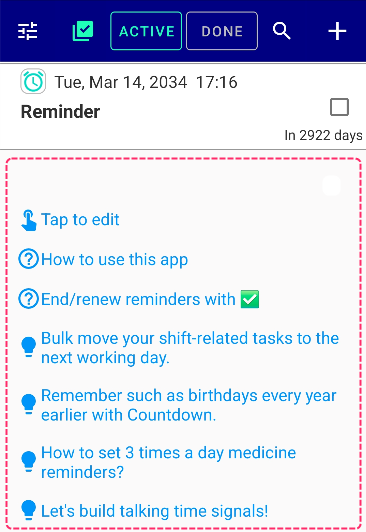
Go to Settings → Other Advanced Settings
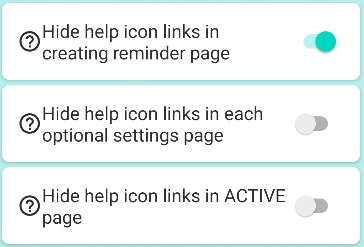
By turning these 3 switches ON, you can hide unnecessary hint/question mark/tips/help links.
General
TwitterFacebookはてブPocketLINEPinterest
Celestial Brain -Mobile app developer-

FAQ page

Reminder FLEX on Google Play Store

Related posts

General

Replace Clone with Recycle on DONE page

Usually, if you want to reuse an item on your DONE history tab to create a new reminder, you can do so with the "Clone" ...
General

Hide some tasks from the list.

Do you want to hide some tasks from the list? Use color hide funciton and you can do it! *Hide color is available ...
General

What is My holidays & how to use skip holiday?

Holidays registered as My Holidays on the Holidays page can be skipped without ringing on repeat by turning on "Skip...
General

You can get daily routines done with Repeat, Snooze & TTS!

By using Repeat, Snooze & Text-to-speech of Reminder FLEX, you will be able to do your daily routines properly, such...
General

Long tap text & select does’t work well

This is a workaround when you want to copy and paste by long pressing text, but you can not select it well. ・Press "C...
General

What is DONE page? What purpose?

DONE page is the history of what & when you did. E.g. Phone app has "Recent call history", right? It's the sa...
Calender View: How to show
ホーム
Reminder FLEX
FAQ
General

Reminder FLEX FAQ

Instant Blood Pressure Tracker FAQ


Reminder FLEX nagging you so you won't miss your tasks. Super easy yet flexible.

Recent Posts

  • Hide tips & (❓) links
  • Calender View: How to show
  • One tap snooze buttons don’t show. Here is why.
  • Red/Yellow bell icon is appearing on the settings icon
  • Full-screen notifications: how to use it?
Celestial Brain -Mobile app developer-
  • Contact us
© 2022 Celestial Brain -Mobile app developer-.