These one-tap snooze buttons appear automatically only when certain conditions are met. (This also applies to the snooze buttons in notifications.)
When Snooze Buttons Are Not Displayed
- They are not displayed for future reminders that have not yet triggered an alert.
- They are not displayed while a regular snooze is still active.
- For repeating reminders, they may not appear if too much time has passed since the original alert.
One-tap snooze buttons are only displayed for past reminders.
If you have already configured snooze settings for a reminder and some snooze alerts are still pending, the one-tap snooze buttons will not appear. However, once all the scheduled snooze alerts have finished, the buttons will become available.
For example, suppose a reminder was scheduled for 8:00 AM. If a long time has passed since the 8:00 AM alert, the snooze buttons may no longer appear.
This is especially true for repeating reminders, as the buttons may also be hidden if snoozing could interfere with the next scheduled occurrence.
If the snooze buttons are not available, you will need to use the Edit or Duplicate feature to schedule the reminder for a new time.
When the “Postpone to Tomorrow” Button Is Displayed (Ver.32.4 or later)
Note: Postpone to tomorrow feature is available starting from Ver.32.4. (Update the app)
- This button is only available for past reminders or reminders scheduled for today.
- For repeating reminders, the button will not appear if postponing the reminder could interfere with the next scheduled occurrence.
- The button may not be available for certain repeat patterns, such as daily or weekday reminders.
- If you select a past reminder and its original scheduled time has not yet passed today, the reminder will be rescheduled for today instead of tomorrow.
How the “Postpone to Tomorrow” Button Works
- When you tap “Postpone to Tomorrow” on a past reminder, it will be moved to today if the original scheduled time has not yet passed today. Otherwise, it will be moved to tomorrow.
- If you use “Postpone to Tomorrow” on a repeating reminder, its original repeat schedule will remain unchanged.
For example, suppose you have a reminder that repeats every Saturday. If you tap “Postpone to Tomorrow” to temporarily move it to Sunday, the reminder will still repeat every Saturday as originally scheduled, even after you mark the postponed reminder as Done ✅.
The original Saturday repeat schedule will continue even if you do not mark the postponed reminder as Done ✅.
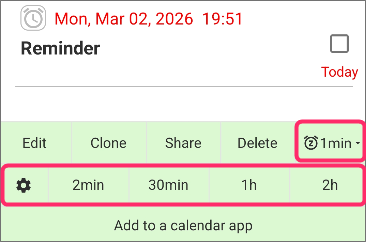
Only One Snooze Button Appears, Even Though the Image Shows Five (Up to Ver.32)
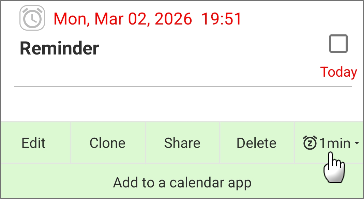
In the state shown in the image, please long-press the displayed button.
Then, all options will be displayed as shown below.
No Snooze Buttons Appear in Notifications
Snooze buttons in notifications are a PRO feature.
If you are using the free version, you can temporarily unlock this PRO feature by playing the in-app game.