Note: This feature is not yet available. It is scheduled to be introduced in Ver.21.6 or later.
With PRO, you can display note excerpts instead of note icons in the “All” and “Daily” lists.
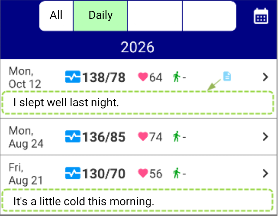
By default, notes are represented by note icons in the “All” and “Daily” list views.
To display note excerpts instead, go to Settings > “Show note excerpts instead of note icons in All and Daily lists” and turn on the switch. When a record contains a note, an excerpt of that note will be displayed.
- Daily list: If there are multiple notes on the same day, an excerpt from the most recent record containing a note will be displayed.
- All list: An excerpt from each record’s note will be displayed.
- Weekly and Monthly lists: Notes will continue to be represented by note icons.
This feature makes it easier to find specific past records by allowing you to preview notes directly in the list, without having to open the record details screen.