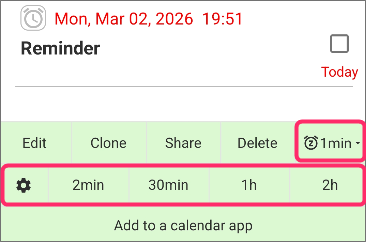
These 1 tap snooze buttons (also in notifications) may not appear in some cases.
The 1 tap snooze button only appears when specific conditions are met.
Patterns where the One-tap snooze buttons are not displayed
- It will not be displayed for future schedules (schedules that have not rung even once yet).
- It will not be displayed if a standard snooze is still active.
- It will not be displayed if a repeat is set and a long period of time has elapsed.
The 1 tap snooze buttons are only displayed for past schedules.
Also, if you set a snooze when setting the reminder and that snooze is still active, the 1 tap snooze button will not be displayed.
It will appear once the snooze has finished ringing for the specified number of times.
It will appear once the snooze has finished ringing for the specified number of times.
Furthermore, suppose the reminder is set for 8:00 AM.
If a long time has passed since this 8:00 AM alert rang, it will not be displayed.
In particular, for reminders with a repeat setting, it will not be displayed if it is likely to interfere with the next repeated occurrence.
If a long time has passed since this 8:00 AM alert rang, it will not be displayed.
In particular, for reminders with a repeat setting, it will not be displayed if it is likely to interfere with the next repeated occurrence.
If it is not displayed, you will simply need to use the edit or clone function to reset the reminder for a new time.
There are 5 buttons in the image, but only 1 is displayed
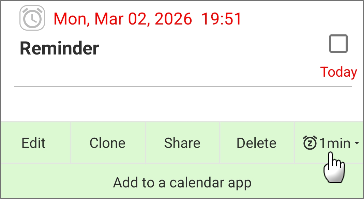
In the state shown in the image, please long-press the displayed button.
Then, all options will be displayed as shown below.
No buttons are displayed in the notification at all
The snooze button within notifications is a PRO feature.
If you are using the free version, you can unlock PRO features for a certain period by playing the game.