Skip to content
Reminder FLEX & Instant Blood Pressure Tracker android app official site
Celestial Brain -Mobile app developer-
  • Google Play Store
    • Reminder FLEX
    • Instant BP Tracker
  • Reminder FLEX FAQ
  • Instant BP FAQ
  • News & updates
  • Contact us
  • Reminder FLEX FAQ
  • Instant Blood Pressure Tracker FAQ
  • Google Play Store

How to change default alert type?

Alarting
2026.04.05

To have a specific alert type, such as “Alarm,” pre-selected by default when creating a new reminder, you can change the initial settings here:

Settings → Presets (Default values) → Alert Type
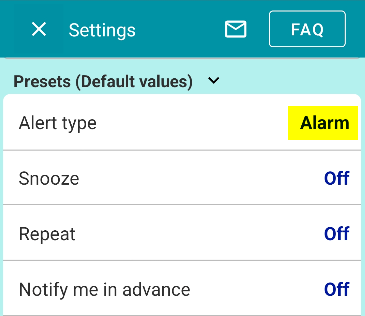
The option you select here will become the default alert type whenever you create a new reminder.
Alarting
X Facebook Hatena Bookmark LINE Pinterest
Celestial Brain -Mobile app developer-

FAQ page

Reminder FLEX on Google Play Store

Related posts

Alarting

When alerts not ring or work, check these

If alerts such as "Notification, Alarm, or Text-to-speech" do not ring or arrive, please check the following.1. Are all ...
Cancel subscription & Check the next billing day
10-Minute Repeat Reminder: Voice Notifications for Android
Home
Reminder FLEX
FAQ
Alarting

Reminder FLEX FAQ

Instant Blood Pressure Tracker FAQ


Reminder FLEX nagging you so you won't miss your tasks. Super easy yet flexible.

Recent Posts

  • How to Fix Incorrect or Missing Records in the Record List Using Recalculate Averages
  • Show note excerpts instead of icons in the All and Daily lists
  • Instant Blood Pressure Tracker Privacy Policy
  • Change Speed of Text-to-speech (Read too fast/slow)
  • Hide BP photos from the Gallery on Samsung Galaxy
Celestial Brain -Mobile app developer-
  • Contact us
© 2022 Celestial Brain -Mobile app developer-.