Reminder FLEX & BP Log Scan&Go android app official site
Celestial Brain -Mobile app developer-
  • Google Play Store
    • Reminder FLEX
    • BP Log: Scan&Go
  • Reminder FLEX FAQ
  • BP Log FAQ
  • News & updates
  • Contact us
  • Reminder FLEX FAQ
  • Blood Pressure Log: Quick Scan FAQ
  • Google Play Store

How to restart Reminder FLEX app? When you got something wrong.

Troubleshooting
2023.01.06 2022.09.23

If Reminder FLEX app is showing unexpected behavior, then try restarting.

How to restart the app?

Open multi task window.
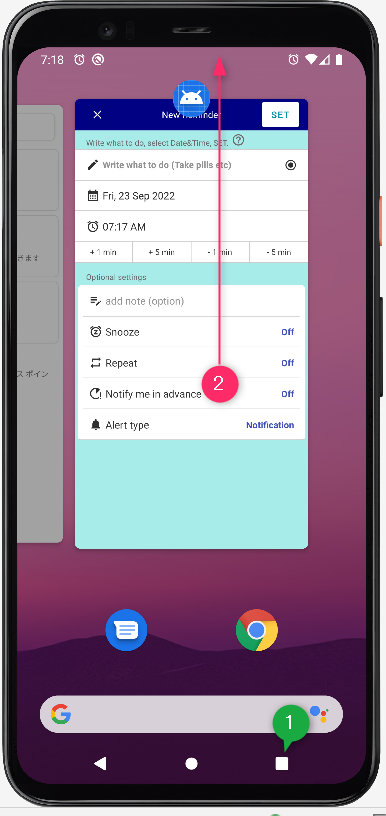
Swipe up the app.

Then, open the app again. Now the app is restarted.
Troubleshooting
TwitterFacebookはてブPocketLINEPinterest
Celestial Brain -Mobile app developer-

FAQ page

Reminder FLEX on Google Play Store

Related posts

Troubleshooting

App language doesn’t change to selected one.

If the app does not change to the language you selected within the app, you will need to follow the steps below. Caus...
Troubleshooting

I set a music file as the alarm sound, but it doesn’t play.

This is a solution if you set an MP3 file or other file on your device as your alarm sound, but the default alarm sound ...
Troubleshooting

About Android 13. – If you have problem with –

17th Sep 2022 updated Reminder FLEX has started to support Android 13 Since Ver.9.4 If you use Reminder FLEX on Andr...
Troubleshooting

Jump to Main wrongly when tap shortcut or widget plus button.

When you tap the shortcut or plus button of widget, it's supposed to be jump to reminder creation page. However if you a...
Text-to-speech

Text-to-speech voice sounds like a broken radio

This is how to deal with problems such as when the Text to speech voice suddenly becomes a strange voice like a broken r...
Troubleshooting

Deleted-alerts still ring? Here is how to fix.

The alerts which has been already deleted still go off? In that case, please do the following. Method1: Restart your...
Repeat alert every 1 min or specific minutes
Deleted-alerts still ring? Here is how to fix.
ホーム
Reminder FLEX
FAQ
Troubleshooting

Reminder FLEX FAQ

BP Log: Quick Scan FAQ


Reminder FLEX nagging you so you won't miss your tasks. Super easy yet flexible.

Recent Posts

  • Blood Pressure Log: Quick Scan Privacy Policy
  • Change Speed of Text-to-speech (Read too fast/slow)
  • Hide BP photos from the Gallery on Samsung Galaxy
  • How to Test Text-to-Speech Playback
  • “Limit to 500 alert” message appears.
Celestial Brain -Mobile app developer-
  • Contact us
© 2022 Celestial Brain -Mobile app developer-.