Reminder FLEX & Photo BP android app official site
Celestial Brain -Mobile app developer-
  • Google Play Store
    • Reminder FLEX
    • Instart BP Tracker
  • Reminder FLEX FAQ
  • Photo BP FAQ
  • News & updates
  • Contact us
  • Reminder FLEX FAQ
  • Instant Blood Pressure Tracker FAQ
  • Google Play Store

How to restart Reminder FLEX app? When you got something wrong.

Troubleshooting
2023.01.06 2022.09.23

If Reminder FLEX app is showing unexpected behavior, then try restarting.

How to restart the app?

Open multi task window.
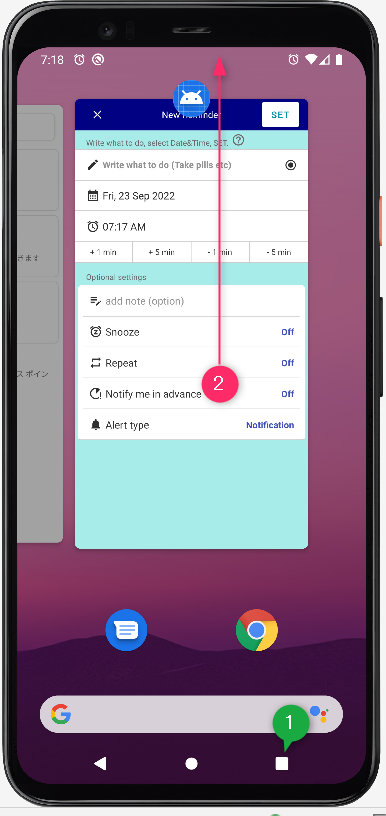
Swipe up the app.

Then, open the app again. Now the app is restarted.

Troubleshooting
TwitterFacebookはてブPocketLINEPinterest
Celestial Brain -Mobile app developer-

FAQ page

Reminder FLEX on Google Play Store

Related posts

General

Red/Yellow bell icon is appearing on the settings icon

This guide explains the causes and solutions for when a yellow or red bell icon appears on the Settings icon. If...
Troubleshooting

Date Order of the list got wrong position

If your list got strange order like below, E.g. above image, one "Tomorrow" item got stuck in the past (Yellow one). ...
Troubleshooting

App language doesn’t change to selected one.

If the app does not change to the language you selected within the app, you will need to follow the steps below. Caus...
Troubleshooting

Deleted-alerts still ring? Here is how to fix.

The alerts which has been already deleted still go off? In that case, please do the following. Method1: Restart your...
Text-to-speech

Text-to-speech voice sounds like a broken radio

This is how to deal with problems such as when the Text to speech voice suddenly becomes a strange voice like a broken r...
Troubleshooting

About Android 13. – If you have problem with –

17th Sep 2022 updated Reminder FLEX has started to support Android 13 Since Ver.9.4 If you use Reminder FLEX on Andr...
Repeat alert every 1 min or specific minutes
Deleted-alerts still ring? Here is how to fix.
ホーム
Reminder FLEX
FAQ
Troubleshooting

Reminder FLEX FAQ

Instant Blood Pressure Tracker FAQ


Reminder FLEX nagging you so you won't miss your tasks. Super easy yet flexible.

Recent Posts

  • Hide tips & (❓) links
  • Calender View: How to show
  • One tap snooze buttons don’t show. Here is why.
  • Red/Yellow bell icon is appearing on the settings icon
  • Full-screen notifications: how to use it?
Celestial Brain -Mobile app developer-
  • Contact us
© 2022 Celestial Brain -Mobile app developer-.