Do you ever find yourself forgetting small but important tasks throughout the day? Maybe you meant to drink water regularly, follow a work routine, or take medication on time, but a single reminder just wasn’t enough. If you’re searching for an Android reminder app that can notify you every 10 minutes, there’s a simple and flexible solution.
With Reminder FLEX, you can set repeat reminders at precise intervals like every 10 minutes or even every 5 minutes, and choose how you want to be notified, including voice alerts that tell you exactly what to do without needing to look at your screen.
Key Features of the 10-Minute Repeat Reminder
- Set reminders to repeat every 10 minutes, 5 minutes, or any custom interval
- Choose how many times the reminder repeats after the start time
- Select alert type per reminder: standard notification, full-screen notification, voice notification (read aloud), or alarm
- Enable sound even in silent mode if needed
- Use voice notifications to hear your task without checking your phone
- Create unlimited reminders for free
This flexibility makes it easy to build a system that actually works for your daily habits, instead of relying on one-time alerts that are easy to ignore.
How to Create a 10-Minute Repeat Reminder
When set a reminder, go to Snooze.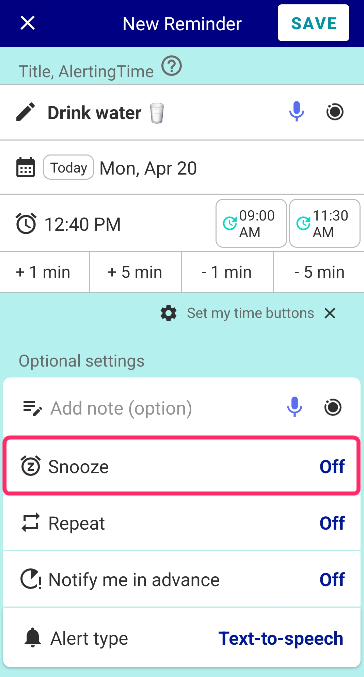
Set the interval minutes and repeat times.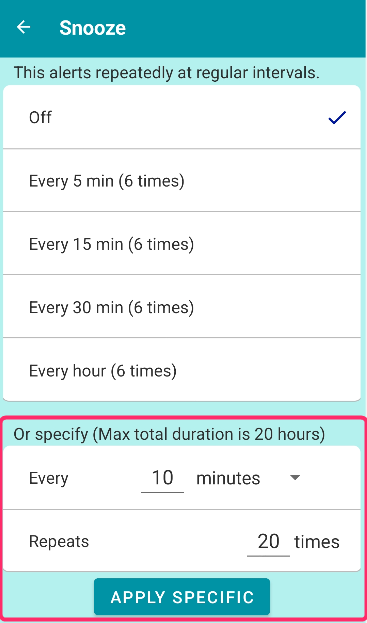
Also if you want to repeat it every day, set Repeat together.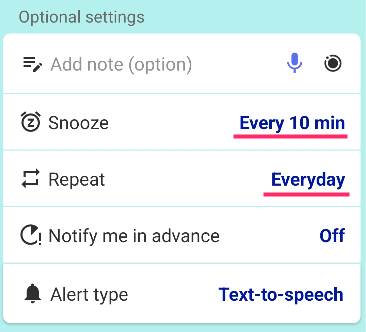
Once set, the app will continue reminding you at the chosen interval, helping you stay consistent without manually resetting anything.
Q&A
Q: Is this feature free to use?
Yes. You can set as many 10-minute repeat reminders as you want at no cost.
Q: Can I customize how I get notified?
Yes. Each reminder can use a different alert type, including voice, alarm, or full-screen alerts.
Q: Will it still make sound in silent mode?
You can choose whether the reminder overrides silent mode, depending on how important the task is.
Q: Do I need to keep the app open?
No. Once the reminder is set, it works in the background.
Real-Life Use Cases
Work and Task Management
If you tend to lose focus or forget ongoing tasks, a reminder every 10 minutes can keep you on track. For example, you can set periodic alerts to check progress, switch tasks, or stay mindful of deadlines.
Hydration and Health Habits
Staying hydrated is easy to forget. A repeating reminder every 10 minutes or longer intervals can help you build consistent habits without relying on memory.
Medication Reminders
For time-sensitive medication schedules, repeating alerts ensure you don’t miss a dose. Voice notifications are especially useful when you’re busy or away from your phone.
Hands-Free Situations
Voice notifications allow you to hear your reminder without looking at your screen, which is helpful while driving, cooking, or working.
Stay Consistent with Less Effort
A single reminder is often not enough for tasks that require consistency. By using a repeat reminder every 10 minutes with flexible notification options, you can build a system that supports your routine instead of interrupting it.
If you’re looking for a simple way to stay on top of tasks, habits, or schedules, try setting up a repeat reminder with Reminder FLEX and see how much easier it becomes to stay organized.