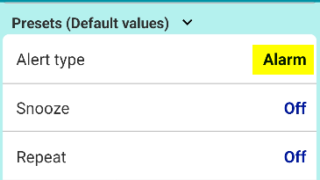
AlartingHow to change default alert type? To have a specific alert type, such as "Alarm," pre-selected by default when creating a new reminder, you can change the... 2026.04.05Alarting
PROCancel subscription & Check the next billing day for Reminder FLEX Open Google Play Store app. Tap your account. Then follow below. Press "Cancel subscription" and done. A... 2026.03.27PRO
PROWhat happens after the free trial ends? [Reminder FLEX] Some features in Reminder FLEX marked with a ★ are premium features. Many of these premium features come with a free tr... 2026.03.27PRO
GeneralHide tips & (❓) links If you are using the Paid PRO version, you can hide the (❓) links/hint links/tips links/help links by following t... 2026.03.13General
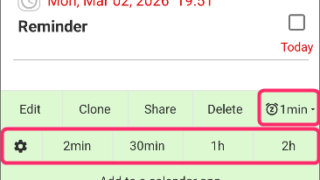
SnoozeOne tap snooze buttons don’t show. Here is why. These 1 tap snooze buttons (also in notifications) may not appear in some cases. The 1 tap snooze button only appea... 2026.03.02Snooze
GeneralRed/Yellow bell icon is appearing on the settings icon This guide explains the causes and solutions for when a yellow or red bell icon appears on the Settings icon. If... 2026.02.25GeneralTroubleshooting
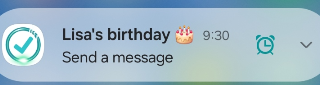
NotificationFull-screen notifications: how to use it? the Full-Screen Notification feature has been implemented. (from Ver.28) In the case of a standard notification, it a... 2026.02.25Notification
AlartingWhen alerts not ring or work, check these If alerts such as "Notification, Alarm, or Text-to-speech" do not ring or arrive, please check the following. 1. Are al... 2026.02.23Alarting
Snooze1-tap snooze/re-notify feature Reminder FLEX has 1-tap snooze/re-notify feature. On notification For PRO version, you can re-notify after certain min... 2025.12.10Snooze
PROFAQ about PRO (FLEX) Check the next billing day & Cancel PRO subscription You can check next billing day & cancel subscription from ... 2025.11.15PRO
 AlartingAlarting
 PRO
PRO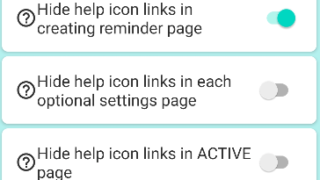 General
 Snooze
 General
 Notification
 Alarting
 Snooze
 PRO
PRO