Reminder FLEX & Photo BP android app official site
Celestial Brain -Mobile app developer-
  • Google Play Store
    • Reminder FLEX
    • Instart BP Tracker
  • Reminder FLEX FAQ
  • Photo BP FAQ
  • News & updates
  • Contact us
  • Reminder FLEX FAQ
  • Instant Blood Pressure Tracker FAQ
  • Google Play Store

How to change default alert type?

Alarting
2026.04.05

To have a specific alert type, such as “Alarm,” pre-selected by default when creating a new reminder, you can change the initial settings here:

Settings → Presets (Default values) → Alert Type
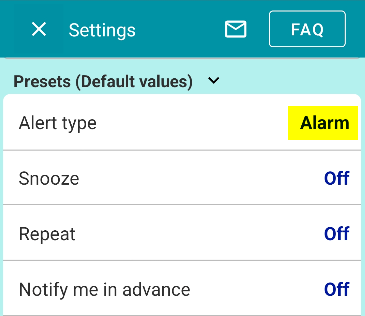
The option you select here will become the default alert type whenever you create a new reminder.
Alarting
TwitterFacebookはてブPocketLINEPinterest
Celestial Brain -Mobile app developer-

FAQ page

Reminder FLEX on Google Play Store

Related posts

Alarting

When alerts not ring or work, check these

If alerts such as "Notification, Alarm, or Text-to-speech" do not ring or arrive, please check the following. 1. Are al...
Cancel subscription & Check the next billing day for Reminder FLEX
ホーム
Reminder FLEX
FAQ
Alarting

Reminder FLEX FAQ

Instant Blood Pressure Tracker FAQ


Reminder FLEX nagging you so you won't miss your tasks. Super easy yet flexible.

Recent Posts

  • How to change default alert type?
  • Cancel subscription & Check the next billing day for Reminder FLEX
  • What happens after the free trial ends? [Reminder FLEX]
  • Record Multiple Blood Pressure Readings Android App
  • Thai language & Thai buddhist year supported Reminder app Android
Celestial Brain -Mobile app developer-
  • Contact us
© 2022 Celestial Brain -Mobile app developer-.