Reminder FLEX & Photo BP android app official site
Celestial Brain -Mobile app developer-
  • Google Play Store
    • Reminder FLEX
    • Instart BP Tracker
  • Reminder FLEX FAQ
  • Photo BP FAQ
  • News & updates
  • Contact us
  • Reminder FLEX FAQ
  • Instant Blood Pressure Tracker FAQ
  • Google Play Store

Hide tips & (❓) links

General
2026.03.13

If you are using the Paid PRO version, you can hide the (❓) links/hint links/tips links/help links by following the steps below.
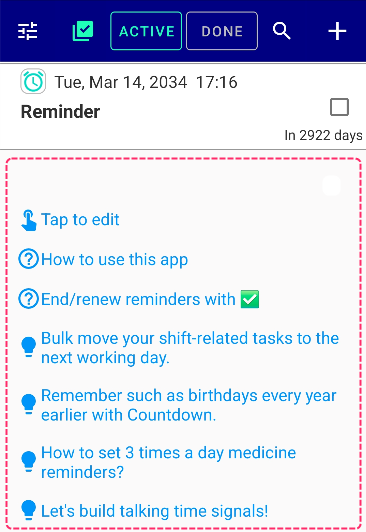
Go to Settings → Other Advanced Settings
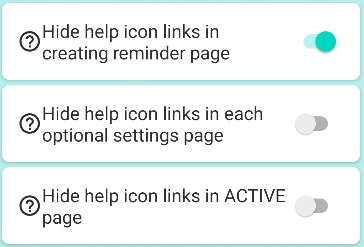
By turning these 3 switches ON, you can hide unnecessary hint/question mark/tips/help links.
General
TwitterFacebookはてブPocketLINEPinterest
Celestial Brain -Mobile app developer-

FAQ page

Reminder FLEX on Google Play Store

Related posts

General

I want to Edit and Tick together.

If you want to edit the reminder & mark as done✅ together, Press Clone instead of Edit. Enter a new date...
General

Can’t login to Google drive for backup.

if you keep failing to loging in, Try using same google account as you are loging into Google play store. Ma...
General

Can I input text with voice?

Generally, most of the software keyboards has voice input. You can use that. We believe your genuine device keybo...
General

Category feature? Yes, there is!

We often receive requests for category or group organization, and in Reminder FLEX, you can organize your reminders by c...
General

What is My holidays & how to use skip holiday?

Holidays registered as My Holidays on the Holidays page can be skipped without ringing on repeat by turning on "Skip...
General

Remember such as birthdays every year earlier with Countdown.

For events such as birthdays where you need to prepare gifts in advance, let's use Reminder FLEX's Notify me in advance ...
Calender View: How to show
ホーム
Reminder FLEX
FAQ
General

Reminder FLEX FAQ

Instant Blood Pressure Tracker FAQ


Reminder FLEX nagging you so you won't miss your tasks. Super easy yet flexible.

Recent Posts

  • Hide tips & (❓) links
  • Calender View: How to show
  • One tap snooze buttons don’t show. Here is why.
  • Red/Yellow bell icon is appearing on the settings icon
  • Full-screen notifications: how to use it?
Celestial Brain -Mobile app developer-
  • Contact us
© 2022 Celestial Brain -Mobile app developer-.