Reminder FLEX & BP Log Scan&Go android app official site
Celestial Brain -Mobile app developer-
  • Google Play Store
    • Reminder FLEX
    • BP Log: Scan&Go
  • Reminder FLEX FAQ
  • BP Log FAQ
  • News & updates
  • Contact us
  • Reminder FLEX FAQ
  • Blood Pressure Log: Quick Scan FAQ
  • Google Play Store

Can I input text with voice?

General
2023.01.06

Generally, most of the software keyboards has voice input. You can use that.
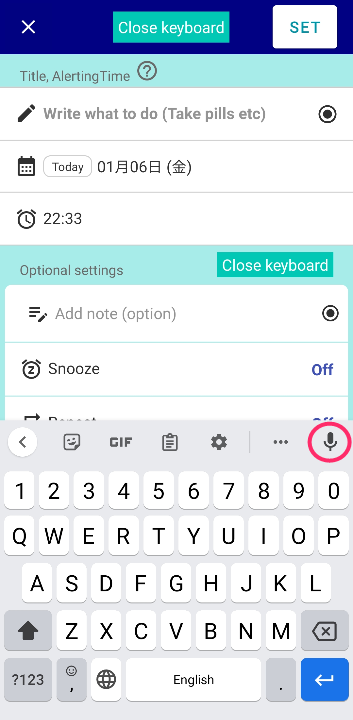
We believe your genuine device keyboard has this.
If not, download Gboard from google. This has voice input.

 

General
TwitterFacebookはてブPocketLINEPinterest
Celestial Brain -Mobile app developer-

FAQ page

Reminder FLEX on Google Play Store

Related posts

General

Backup your Reminder FLEX data into Google Drive. HowTo?

This video shows how to backup your Reminder FLEX data into Google Drive.
General

Voice input button. Long sentence, language or hide etc..

A voice input button has been added from Ver.18. How to type a long sentence with the voice input button? Ap...
General

Long press an item to perform bulk operations

Long press an Item. You can select multiple items & do the bulk oparations. Move today’s and tomorrow’s eve...
General

With Repeat, the date doesn’t change automatically.

Question: Repeat is ON, but it doesn't switch to the next repeat day, it's stays in the "Past". Answer: For ex...
General

Replace Clone with Recycle on DONE page

Usually, if you want to reuse an item on your DONE history tab to create a new reminder, you can do so with the "Clone" ...
General

Red/Yellow bell icon is appearing on the settings icon

This guide explains the causes and solutions for when a yellow or red bell icon appears on the Settings icon. If...
Change default value of set screen (Presets)
About behavior when 2 alarms ring at the exact same time. What would happens?
ホーム
Reminder FLEX
FAQ
General

Reminder FLEX FAQ

BP Log: Quick Scan FAQ


Reminder FLEX nagging you so you won't miss your tasks. Super easy yet flexible.

Recent Posts

  • Change Speed of Text-to-speech (Read too fast/slow)
  • Hide BP photos from the Gallery on Samsung Galaxy
  • How to Test Text-to-Speech Playback
  • “Limit to 500 alert” message appears.
  • Delay the 2nd reading when read aloud twice
Celestial Brain -Mobile app developer-
  • Contact us
© 2022 Celestial Brain -Mobile app developer-.