Reminder FLEX & BP Log Scan&Go android app official site
Celestial Brain -Mobile app developer-
  • Google Play Store
    • Reminder FLEX
    • BP Log: Scan&Go
  • Reminder FLEX FAQ
  • BP Log FAQ
  • News & updates
  • Contact us
  • Reminder FLEX FAQ
  • Blood Pressure Log: Quick Scan FAQ
  • Google Play Store

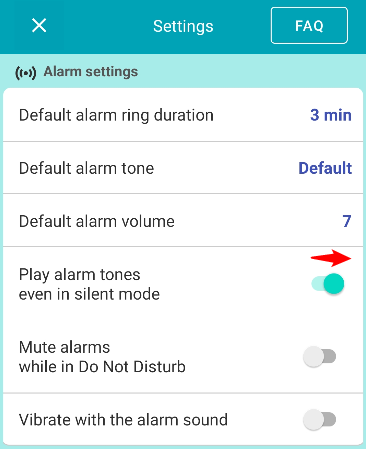
Set Alarm & Text-to-speech sound in Silent mode

Alarm
2025.08.07 2023.04.19

Go to settings.

Turn swiches on.


AlarmText-to-speech
TwitterFacebookはてブPocketLINEPinterest
Celestial Brain -Mobile app developer-

FAQ page

Reminder FLEX on Google Play Store

Related posts

Text-to-speech

How to Test Text-to-Speech Playback

How to Test Text-to-Speech Playback To test the text-to-speech playback of the reminder title, set the reminder date ...
Text-to-speech

Text-to-speech volume doesn’t change?

Please double check you are changing NOT alarm volume, but Text-to-speech volume.
Alarm

Change alarm volume, duration & tone. Here is how to do.

When you want to change Alarm volume, duration & tone of the reminder which already you' ve set, Tap Edit. ...
Text-to-speech

Delay the 2nd reading when read aloud twice

*This feature is available in Ver. 30.2 and later. (Update the app) When the "Read twice" feature is enabled, the sec...
Text-to-speech

Change Speed of Text-to-speech (Read too fast/slow)

If the speech is too fast or too slow, you can change the speed in your device's text-to-speech settings. Open your d...
Alarm

About behavior when 2 alarms ring at the exact same time. What would happens?

If you set 2 reminders with alert type "Alarm", and set exact same time. For example, Reminder A ring at 3:03, Remind...
Voice input button. Long sentence, language or hide etc..
Saving electricity & money with reminders.
ホーム
Reminder FLEX
FAQ
Alarting
Alarm

Reminder FLEX FAQ

BP Log: Quick Scan FAQ


Reminder FLEX nagging you so you won't miss your tasks. Super easy yet flexible.

Recent Posts

  • Blood Pressure Log: Quick Scan Privacy Policy
  • Change Speed of Text-to-speech (Read too fast/slow)
  • Hide BP photos from the Gallery on Samsung Galaxy
  • How to Test Text-to-Speech Playback
  • “Limit to 500 alert” message appears.
Celestial Brain -Mobile app developer-
  • Contact us
© 2022 Celestial Brain -Mobile app developer-.