Reminder FLEX & BP Log Scan&Go android app official site
Celestial Brain -Mobile app developer-
  • Google Play Store
    • Reminder FLEX
    • BP Log: Scan&Go
  • Reminder FLEX FAQ
  • BP Log FAQ
  • News & updates
  • Contact us
  • Reminder FLEX FAQ
  • Blood Pressure Log: Quick Scan FAQ
  • Google Play Store

Can I input text with voice?

General
2023.01.06

Generally, most of the software keyboards has voice input. You can use that.
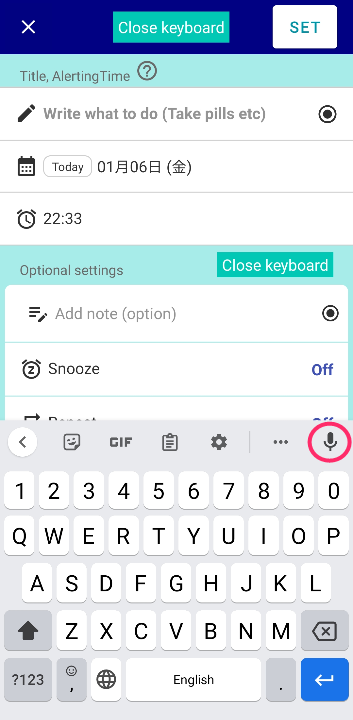
We believe your genuine device keyboard has this.
If not, download Gboard from google. This has voice input.
 

General
TwitterFacebookはてブPocketLINEPinterest
Celestial Brain -Mobile app developer-

FAQ page

Reminder FLEX on Google Play Store

Related posts

General

Category/Group feature?

You can assign a category name to each title color and use it as a category. Go to Settings → Presets → "Category N...
General

What is My holidays & how to use skip holiday?

Holidays registered as My Holidays on the Holidays page can be skipped without ringing on repeat by turning on "Skip...
General

Quick Set feature

Quick Set is a feature that lets you save frequently used patterns. After setting the time, snooze, etc., press “Add ...
General

I can’t edit DONE reminder & make it ACTIVE again.

If you tap "Edit" on DONE page, This only you can edit note of "DONE history" and it won't ring. (You can't select fut...
General

You can get daily routines done with Repeat, Snooze & TTS!

By using Repeat, Snooze & Text-to-speech of Reminder FLEX, you will be able to do your daily routines properly, such...
General

Remember such as birthdays every year earlier with Countdown.

For events such as birthdays where you need to prepare gifts in advance, let's use Reminder FLEX's Notify me in advance ...
Change default value of set screen (Presets)
About behavior when 2 alarms ring at the exact same time. What would happens?
ホーム
Reminder FLEX
FAQ
General

Reminder FLEX FAQ

BP Log: Quick Scan FAQ


Reminder FLEX nagging you so you won't miss your tasks. Super easy yet flexible.

Recent Posts

  • Change Speed of Text-to-speech (Read too fast/slow)
  • Hide BP photos from the Gallery on Samsung Galaxy
  • How to Test Text-to-Speech Playback
  • “Limit to 500 alert” message appears.
  • Delay the 2nd reading when read aloud twice
Celestial Brain -Mobile app developer-
  • Contact us
© 2022 Celestial Brain -Mobile app developer-.