Reminder FLEX & Photo BP android app official site
Celestial Brain -Mobile app developer-
  • Google Play Store
    • Reminder FLEX
    • Instart BP Tracker
  • Reminder FLEX FAQ
  • Photo BP FAQ
  • News & updates
  • Contact us
  • Reminder FLEX FAQ
  • Instant Blood Pressure Tracker FAQ
  • Google Play Store

Text-to-speech

Text-to-speech

Text-to-speech voice sounds like a broken radio

This is how to deal with problems such as when the Text to speech voice suddenly becomes a strange voice like a broken r...
2023.04.30
Text-to-speechTroubleshooting
Alarm

Set Alarm & Text-to-speech sound in Silent mode

Go to settings. Turn swiches on.
2023.04.19
AlarmText-to-speech
Text-to-speech

How to change to different TTS voice

Do you want to change to different TTS voice? Your device might have another voice! Open Settings of your device. ...
2023.03.08
Text-to-speech
Text-to-speech

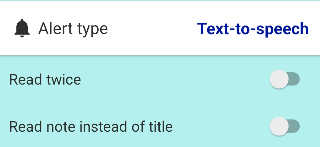
I want TTS to speak twice

If you want the app to read aloud twice, like “Take medicines, Take medicines” you can do it in the following ways depen...
2023.01.21
Text-to-speech
Text-to-speech

Text-to-speech volume doesn’t change?
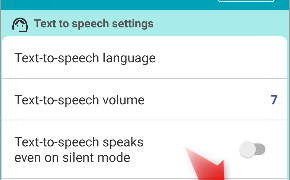
Please double check you are changing NOT alarm volume, but Text-to-speech volume.
2022.12.04
Text-to-speech
Text-to-speech

Mute beginning of Text-to-speech beep sound

You can mute beep sound which ding before text-to-speech speaks.
2022.09.06
Text-to-speech
ホーム
Reminder FLEX
FAQ
Alarting
Text-to-speech

Reminder FLEX FAQ

Instant Blood Pressure Tracker FAQ


Reminder FLEX nagging you so you won't miss your tasks. Super easy yet flexible.

Recent Posts

  • One tap snooze buttons don’t show. Here is why.
  • Red/Yellow bell icon is appearing on the settings icon
  • Full-screen notifications: how to use it?
  • When alerts not ring or work, check these
  • Android app – Reminder FLEX all features
Celestial Brain -Mobile app developer-
  • Contact us
© 2022 Celestial Brain -Mobile app developer-.