Reminder FLEX & Instant Blood Pressure Tracker android app official site
Celestial Brain -Mobile app developer-
  • Google Play Store
    • Reminder FLEX
    • Instant BP Tracker
  • Reminder FLEX FAQ
  • Instant BP FAQ
  • News & updates
  • Contact us
  • Reminder FLEX FAQ
  • Instant Blood Pressure Tracker FAQ
  • Google Play Store

Long tap text & select does’t work well

General
2023.07.05

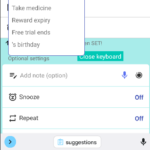
This is a workaround when you want to copy and paste by long pressing text, but you can not select it well.

・Press “Close Keyboard” to close the keyboard once.
・When keyboard is not showing, long press text. you should be able to choose.
General
TwitterFacebookはてブPocketLINEPinterest
Celestial Brain -Mobile app developer-

FAQ page

Reminder FLEX on Google Play Store

Related posts

General

How to edit the title input suggestions

From Ver.18.4 of Reminder FLEX, input suggestions are now displayed. With this, you can enter frequently used titles wi...
General

Red/Yellow bell icon is appearing on the settings icon

This guide explains the causes and solutions for when a yellow or red bell icon appears on the Settings icon. If...
General

How to use Public holiday reminders?

By setting a holiday reminder with Reminder FLEX PRO, the holiday will be displayed in the schedule list, You will ...
General

Backup your Reminder FLEX data into Google Drive. HowTo?

This video shows how to backup your Reminder FLEX data into Google Drive.
General

Change default value of set screen (Presets)

You can set your favorite default value for reminder set page. Go to settings > Presets For example, if you o...
General

You can get daily routines done with Repeat, Snooze & TTS!

By using Repeat, Snooze & Text-to-speech of Reminder FLEX, you will be able to do your daily routines properly, such...
How to edit the title input suggestions
How to use Public holiday reminders?
ホーム
Reminder FLEX
FAQ
General

Reminder FLEX FAQ

Instant Blood Pressure Tracker FAQ


Reminder FLEX nagging you so you won't miss your tasks. Super easy yet flexible.

Recent Posts

  • Instant Blood Pressure Tracker Privacy Policy
  • Change Speed of Text-to-speech (Read too fast/slow)
  • Hide BP photos from the Gallery on Samsung Galaxy
  • How to Test Text-to-Speech Playback
  • “Limit to 500 alert” message appears.
Celestial Brain -Mobile app developer-
  • Contact us
© 2022 Celestial Brain -Mobile app developer-.