Reminder FLEX & BP Log Scan&Go android app official site
Celestial Brain -Mobile app developer-
  • Google Play Store
    • Reminder FLEX
    • BP Log: Scan&Go
  • Reminder FLEX FAQ
  • BP Log FAQ
  • News & updates
  • Contact us
  • Reminder FLEX FAQ
  • Blood Pressure Log: Quick Scan FAQ
  • Google Play Store

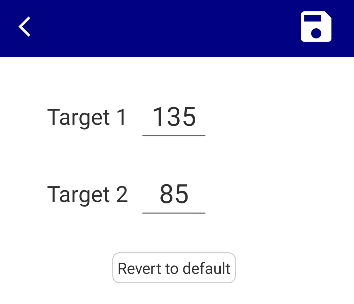
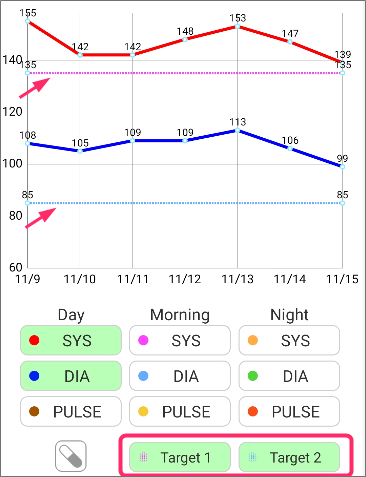
Change target values on the chart

General
2025.08.07 2025.06.08

You can change your blood pressure goal numbers that you want to display on the chart.
General
TwitterFacebookはてブPocketLINEPinterest
Celestial Brain -Mobile app developer-

FAQ page

Instant BP Tracker on Google Play Store

Related posts

General

How to use custom measurements?

In the free version of this app, you can create and record 1 custom measurement item such as weight, body temperature, o...
General

Treat measurements taken after midnight as part of the previous night.

“I measured my blood pressure before going to bed, but it was already past midnight!💦” If you want measur...
General

Auto save after scan

With Auto-save switch is on, after taking or select a photo, edit screen is skipped and automatically save your read...
General

CSV export

This feature is available from Ver.12.7 (Update the app). You can export past blood pressure records in CSV format. ...
General

Where is PDF?

PDF is in Downloads folder. How to access to Downloads folder? Open File explorer app. (There should be in your device...
General

Time period included in morning & night average

You can change the time period when the average value is calculated when multiple measurements are taken on the same...
Auto-backup feature
Time period included in morning & night average
ホーム
Blood Pressure Log: Quick Scan
FAQ
General

Reminder FLEX FAQ

BP Log: Quick Scan FAQ


Reminder FLEX nagging you so you won't miss your tasks. Super easy yet flexible.

Recent Posts

  • Change Speed of Text-to-speech (Read too fast/slow)
  • Hide BP photos from the Gallery on Samsung Galaxy
  • How to Test Text-to-Speech Playback
  • “Limit to 500 alert” message appears.
  • Delay the 2nd reading when read aloud twice
Celestial Brain -Mobile app developer-
  • Contact us
© 2022 Celestial Brain -Mobile app developer-.