When you measure your blood pressure every day, do you ever feel that numbers alone make it hard to remember how you were feeling that day?
For example, what you had for dinner, whether you ate out, or whether the meal seemed high in salt. You may also want to save a photo of your blood pressure monitor screen, or record photos of your physical condition or body changes together with your blood pressure.
Blood pressure numbers are important on their own. However, when you look back later and think, “Maybe my blood pressure was high because of what I ate that day,” or “Maybe I was not feeling well at that time,” having photos can make it much easier to understand.
With the Android app “Instant Blood Pressure Tracker”, you can attach photos from your smartphone to your blood pressure records. You can save photos of breakfast, lunch, dinner, your blood pressure monitor screen, or body changes, and look back at them together with your blood pressure data.
It is a convenient Android blood pressure log app for people who want to record not only their blood pressure numbers, but also their daily life and physical condition.
- Features of “Instant Blood Pressure Tracker”, an Android Blood Pressure Log App That Lets You Attach Photos
- Q&A About Blood Pressure Log Apps with Photos
- This Android Blood Pressure Log App with Photo Saving Is Recommended for You If…
- Start Photo-Based Blood Pressure Logging on Android with Instant Blood Pressure Tracker
Features of “Instant Blood Pressure Tracker”, an Android Blood Pressure Log App That Lets You Attach Photos
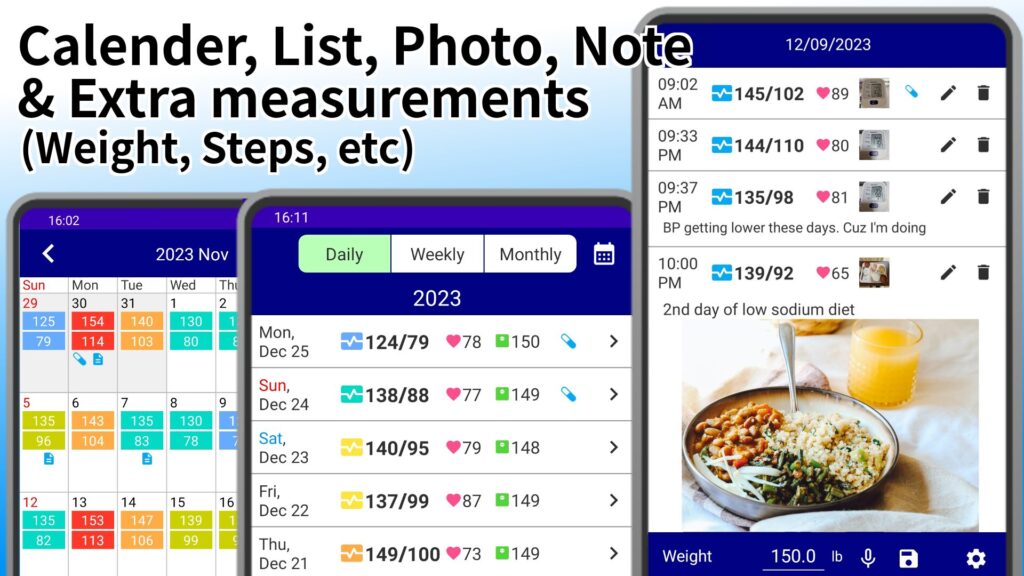
“Instant Blood Pressure Tracker” is a blood pressure log app for Android smartphones. In addition to recording your blood pressure numbers, you can attach and save photos, making it easier to check the situation later.
The main features are as follows.
・Attach photos from your smartphone to your blood pressure records
・Save photos of meals such as breakfast, lunch, and dinner together with your blood pressure
・Attach a photo of your blood pressure monitor screen and keep a record of the measurement
・Look back at photos of body changes or wounds together with your blood pressure records
・Attach photos later to blood pressure records you have already entered
・Attach and display 1 image for each blood pressure record
Even if you look back at your blood pressure numbers, it can be hard to remember why your blood pressure was high that day or what you ate.
However, when photos such as meal photos are saved together with the record, it becomes easier to remember the situation when you look back later.
Attach Meal Photos to Your Blood Pressure Records
Blood pressure may be related to daily habits such as meals, sleep, stress, exercise, and physical condition.
With “Instant Blood Pressure Tracker”, you can attach photos from your smartphone when recording your blood pressure. For example, by saving photos of breakfast, lunch, and dinner together with your blood pressure records, it becomes easier to look back at your meals and blood pressure changes later.
It can also help you review your daily life, such as checking what your blood pressure was like on days when you ate out, or whether your blood pressure tended to be higher on days when you ate meals that seemed high in salt.
You can also leave notes and diary entries together with photos. Voice input is supported.
Save Photos of Your Blood Pressure Monitor Screen as Part of Your Record
Instant Blood Pressure Tracker is an easy blood pressure log app that lets you record your blood pressure simply by scanning the screen of your blood pressure monitor with the camera, without manual entry.
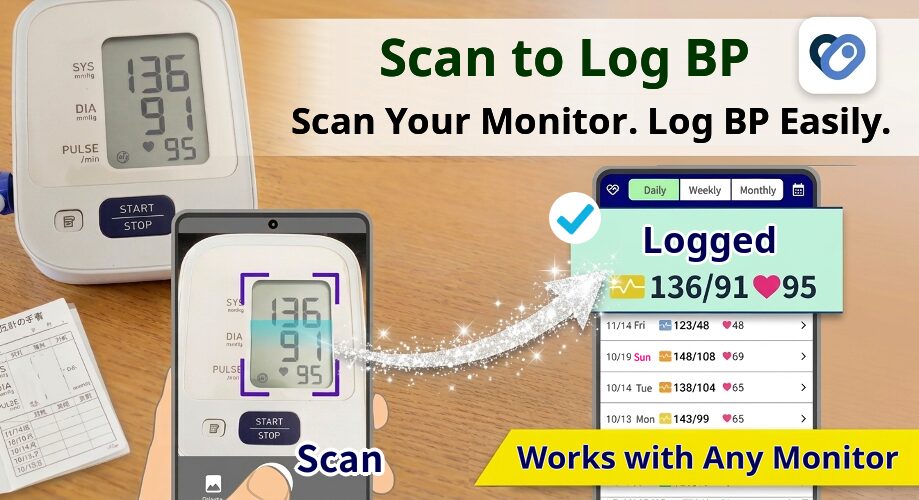
When scanning your blood pressure monitor, you can also keep the photo of the monitor screen at that moment.
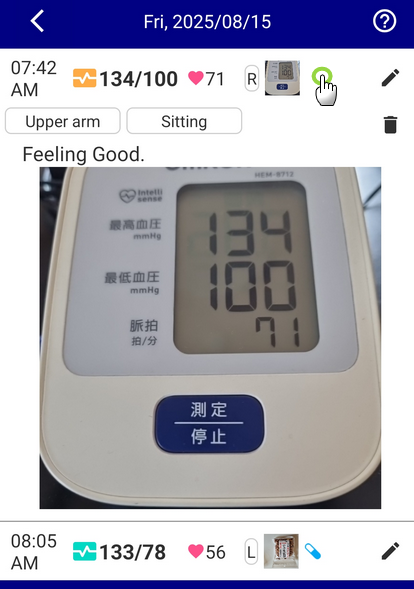
This makes the app convenient for people who want to save a photo of the blood pressure monitor screen when they measure their blood pressure.
For example, when showing your blood pressure records to your doctor, it can make it easier to explain, “This is how I measured it.” It is also useful when you want to show that you have been continuing your daily records together with photos.
Attach Photos to Past Blood Pressure Records
There may be times when you want to add a photo later.
With Instant Blood Pressure Tracker, you can also attach photos to past blood pressure records.
For example, if you entered only your blood pressure first and want to add a meal photo later, you can do that. Even if you could not choose a photo at the time you recorded your blood pressure, you can organize your records later.
Q&A About Blood Pressure Log Apps with Photos
Q. Can I use the photo attachment feature for free?
Yes. In Instant Blood Pressure Tracker, you can use the photo attachment feature for free.
When recording your blood pressure, you can select and attach photos from your smartphone. You can save meal photos, photos of your blood pressure monitor screen, photos related to health management, and more together with your blood pressure records.
Q. How many photos can I record?
You can attach and display 1 image for each blood pressure record.
For example, if you measure your blood pressure 3 times a day, in the morning, afternoon, and evening, you can attach 1 photo to each blood pressure record. In other words, if you record 3 times a day, you can save a total of 3 photos together with your blood pressure records.
Q. What are the benefits of attaching photos to blood pressure records?
When you have photos, it becomes easier to remember the situation of that day when you look back at your records later.
There are things that blood pressure numbers alone cannot show, but with meal photos or photos of your blood pressure monitor screen, you can review your records more clearly.
For daily blood pressure management, being able to check what you ate and how you were feeling that day is a major benefit.
This Android Blood Pressure Log App with Photo Saving Is Recommended for You If…
“Instant Blood Pressure Tracker” is recommended for people who want to:
- Look back at meal records together with blood pressure using photos
- Save breakfast, lunch, and dinner photos together with blood pressure records
- Attach photos of body changes or wounds and see how they relate to blood pressure
- Attach photos of the blood pressure monitor screen and keep them as measurement records
- Show a doctor proof that you have been measuring your blood pressure
- Find a simple and easy-to-use blood pressure log app for Android
- Look back not only at blood pressure numbers, but also at daily life and physical condition
Blood pressure management is something you need to continue every day.
That is why it is important to choose an app that makes recording as easy as possible and lets you look back at your records clearly. With a blood pressure log app that lets you attach photos, it becomes easier to keep track of daily changes that are hard to understand from numbers alone.
Start Photo-Based Blood Pressure Logging on Android with Instant Blood Pressure Tracker
Instant Blood Pressure Tracker is a blood pressure log app for Android smartphones.
In addition to recording blood pressure numbers, you can attach and save photos, so you can look back at meals, blood pressure monitor screens, body changes, and more together with your blood pressure records.
“I record my blood pressure, but when I look back later, I cannot remember what was happening that day.”
“I want to save meal photos together with my blood pressure.”
“I am looking for an Android blood pressure log app that supports photos.”
If this sounds like you, try using “Instant Blood Pressure Tracker” to help manage your daily blood pressure records.