When you record your blood pressure every day, do you ever feel that you want to manage not only your blood pressure, but also your weight, body temperature, steps, and other data in the same place?
For example, does your blood pressure also change when your weight increases? Do your blood pressure and pulse change on days when your body temperature is a little higher? Is there any difference in your blood pressure between days when you walked a lot and days when you walked less?
When you can record not only blood pressure, but also weight, body temperature, steps, distance, and other items together, it becomes easier to look back at changes in your body.
With the Android app “Instant Blood Pressure Tracker”, you can add your own custom items in addition to blood pressure and pulse records. You can add values you want to record, such as weight, body temperature, steps, distance, body fat percentage, calories burned, and sleep time, and keep them as part of your daily records.
You can also display the custom items you add on graphs, so you can compare their changes with your blood pressure and pulse.
It is a convenient Android blood pressure log app for people who want to manage weight, body temperature, and other data together in a blood pressure recording app.
- Features of an Android Blood Pressure Log App That Can Also Record Weight, Body Temperature, Steps, and More
- Q&A About a Blood Pressure App That Can Also Record Weight, Body Temperature, and Steps
- Recommended for People Who Want to Graph Weight, Body Temperature, Steps, and More
- Record Blood Pressure, Weight, Body Temperature, and Steps on Android with Instant Blood Pressure Tracker
Features of an Android Blood Pressure Log App That Can Also Record Weight, Body Temperature, Steps, and More
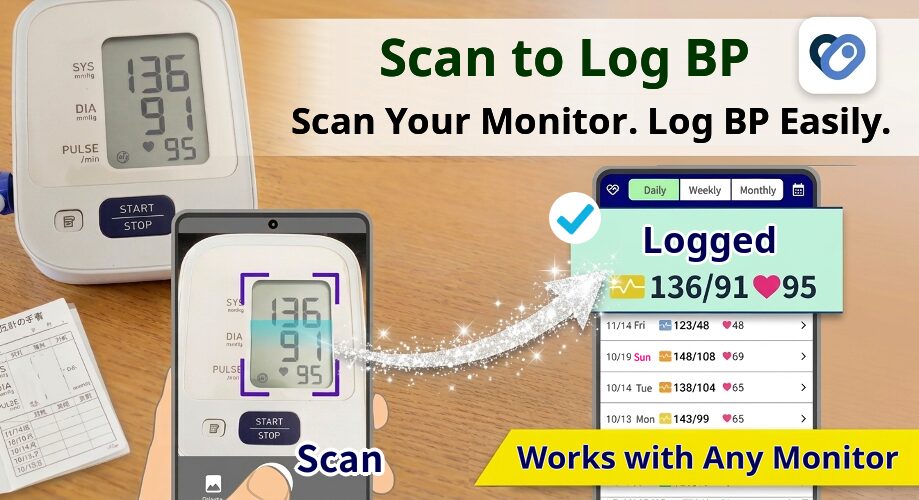
“Instant Blood Pressure Tracker” is a convenient Android blood pressure log app that lets you record your blood pressure simply by scanning the screen of your blood pressure monitor. You can also add your own items other than blood pressure, record them, and display them on graphs.
The main features are as follows.
- As custom items, you can add items such as weight and body temperature. The free version lets you add 1 item, and the PRO version lets you add up to 3 items.
- Custom items can be displayed on graphs. You can view and compare them alongside blood pressure and pulse.
- You can freely create the items you want, such as weight, body temperature, air temperature, steps, blood glucose, oxygen saturation, distance, body fat percentage, calories burned, sleep time, and salt intake.
- You can freely set units such as kg, lb, ml, and km.
- You can easily enter values by voice just by saying a number such as 54.5.
- For 7 items, weight, body fat, lean body mass, body temperature, steps, distance, and calories burned, you can also import data from other health apps via Health Connect.
When you only record blood pressure, you can see changes in the numbers, but it can be hard to look back and understand why your blood pressure was high that day or whether it may have been related to your lifestyle.
However, if you also record weight, body temperature, steps, distance, and other data, it becomes easier to compare changes in your blood pressure with changes in your daily life.
Record Blood Pressure Together with Weight, Body Temperature, Steps, and More
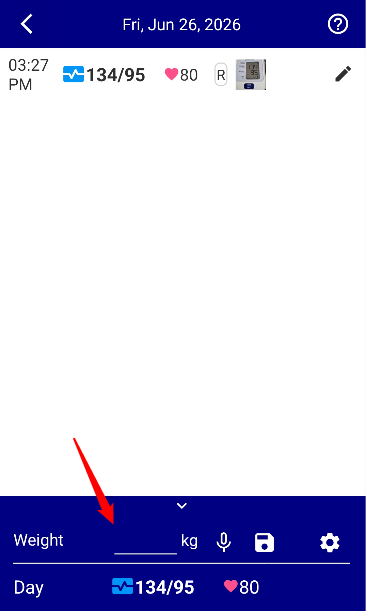
With Instant Blood Pressure Tracker, you can use custom items to record values other than blood pressure in the same app.
For example, if you want to record your weight every day, you can create a “Weight” item. If you want to keep track of your condition, you can create a “Body Temperature” item. If you want to check your activity level, you can create items such as “Steps” or “Distance.”
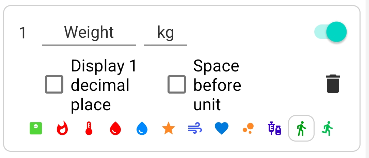
You can also freely set units such as kg and lb. You can choose units that fit the item you want to record, such as weight, distance, body temperature, or calories burned.
Graph Custom Items and Compare Them with Blood Pressure Changes
With Instant Blood Pressure Tracker, you can display the custom items you add on graphs.
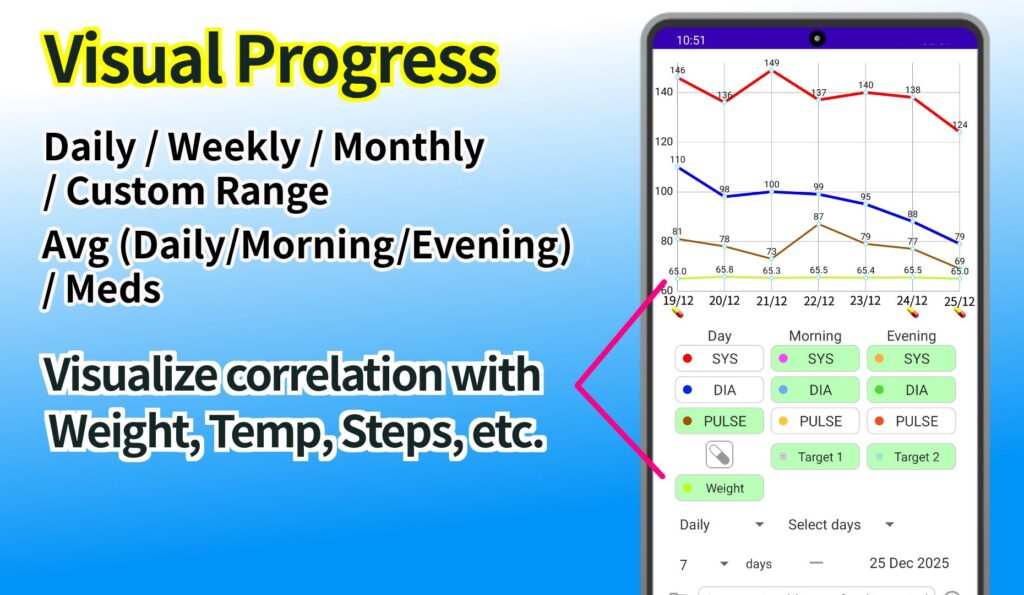
Because changes in weight, body temperature, steps, distance, and other items can be displayed together on the blood pressure and pulse graph, it becomes easier to check what other values looked like on days when your blood pressure was higher.
For example, you can compare changes in weight with changes in blood pressure, or look back to see whether your blood pressure differed between days when you walked more and days when you walked less.
Instead of simply saving values, you can view changes on graphs, making it easier to review your daily records.
Enter Values Such as Weight and Body Temperature by Voice
Apps used for daily records can be hard to continue if entering data feels like a hassle.

With Instant Blood Pressure Tracker, you can enter custom item values by voice. For example, when recording your weight, you can enter the value just by saying a number such as 54.5.
Even when typing numbers by hand feels troublesome, voice input makes it easier to keep recording.
Import Weight, Body Temperature, Steps, and More via Health Connect
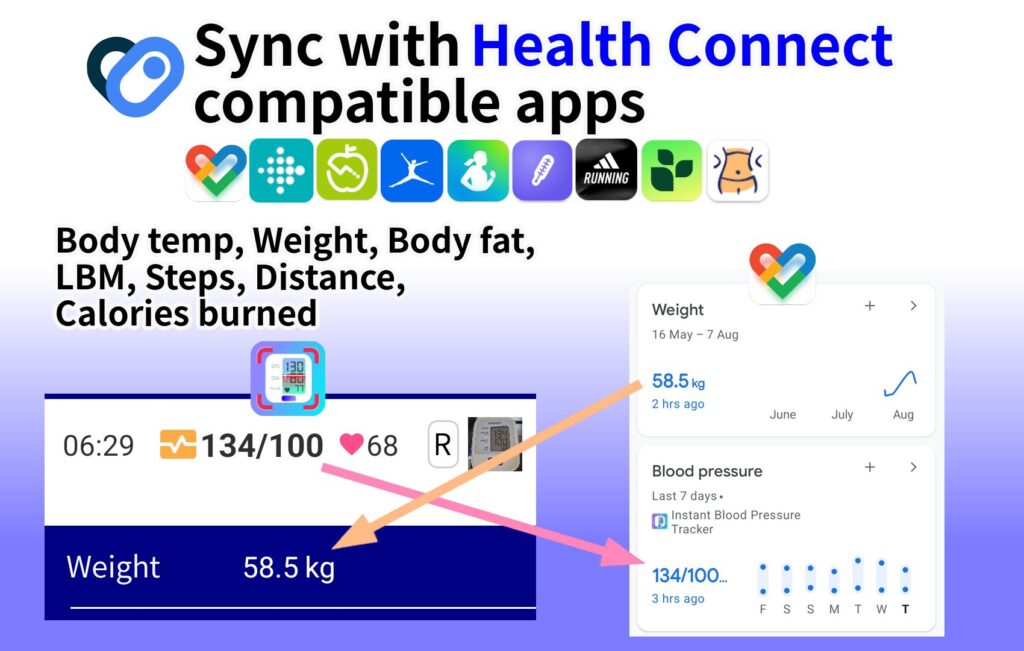
With Instant Blood Pressure Tracker, you can import 7 items from health apps via Health Connect: weight, body fat, lean body mass, body temperature, steps, distance, and calories burned.
For example, you can import data such as steps and weight saved in health apps like Google Fit via Health Connect, and reflect that data in your custom items.
This is useful for people who want to view data recorded in pedometer apps or health apps together with their blood pressure records.
Q&A About a Blood Pressure App That Can Also Record Weight, Body Temperature, and Steps
Q. Can I use the custom item feature for free?
Yes. The free version lets you add 1 custom item, and the PRO version lets you add up to 3 custom items.
By default, “Weight” is included, but you can change it to another item. For example, you can change it to an item you want to record, such as body temperature, steps, distance, blood glucose, oxygen saturation, or sleep time.
You can also use the feature that imports and reflects data from Health Connect for free.
Q. What kind of items can I create?
You can freely create items that can be recorded as numbers, such as weight, body temperature, air temperature, steps, blood glucose, oxygen saturation, distance, body fat percentage, calories burned, sleep time, and salt intake.
Q. Can custom items also be displayed on graphs?
Yes. The custom items you add can not only be recorded, but also displayed on graphs.
Because items such as weight, body temperature, steps, and distance can be displayed together on the blood pressure and pulse graph, you can look back while comparing changes in the values.
Q. What items can be imported from Health Connect?
It supports 7 items: weight, body fat, lean body mass, body temperature, steps, distance, and calories burned.
Data saved in supported health apps can be imported via Health Connect and reflected in the custom items in Instant Blood Pressure Tracker.
Recommended for People Who Want to Graph Weight, Body Temperature, Steps, and More
Instant Blood Pressure Tracker is recommended for people who want to:
・Record and check the relationship between blood pressure and body temperature
・Compare changes in blood pressure, pulse, weight, and other values on a graph
・Look back at steps recorded in a pedometer app together with blood pressure
・Import weight, body temperature, steps, distance, and other data via Health Connect
・Record not only blood pressure, but also weight, body temperature, and other data in one place
・Find a simple blood pressure log app for Android
Blood pressure management is something you need to continue every day.
That is why being able to record not only blood pressure, but also the values you care about, such as weight, body temperature, steps, and distance, can make it easier to look back at daily changes.
Record Blood Pressure, Weight, Body Temperature, and Steps on Android with Instant Blood Pressure Tracker
Instant Blood Pressure Tracker is a blood pressure log app for Android smartphones.
In addition to blood pressure and pulse records, you can add custom items such as weight, body temperature, steps, and distance, then record and graph them.
“I want to manage blood pressure and weight together.”
“I want to look back at body temperature and steps on graphs.”
“I am looking for an Android blood pressure log app that lets me freely add items.”
If this sounds like you, try using “Instant Blood Pressure Tracker” to help with your daily blood pressure management and health records.