Even if you measure your blood pressure every day with a blood pressure monitor, do you ever feel that keeping records is a hassle, or that you want to print your records neatly so you can show them to your doctor?
A handwritten blood pressure notebook can be easy to continue, but it can be a little difficult to look back on later or summarize records for a specific period. Also, even if you record your blood pressure with an Android app, PDF export and CSV export may be paid features in some apps.
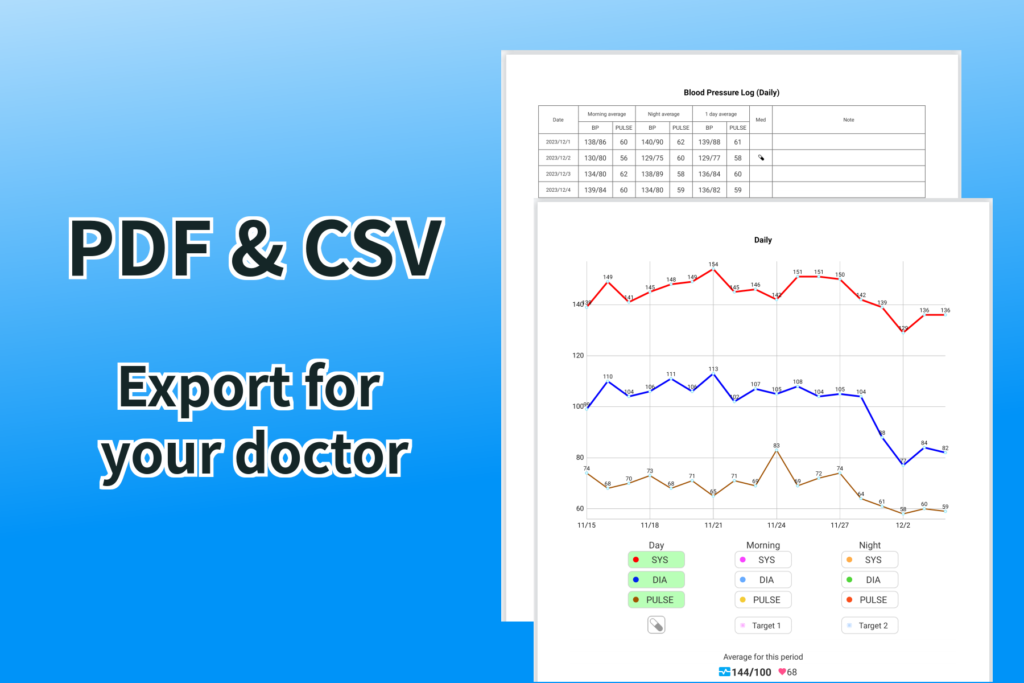
With the Android app “Instant Blood Pressure Tracker”, you can export your past blood pressure records as a PDF, so you can print them in A4 size and show them to your doctor. It also supports CSV export, making it convenient for people who want to organize their records in Excel or Google Sheets.
PDF export and CSV export are also available in the free version.
PDF and CSV Free Export Features of the Blood Pressure Log App “Instant Blood Pressure Tracker”
“Instant Blood Pressure Tracker” is an app that lets you record your blood pressure simply by scanning the screen of your blood pressure monitor with your camera. Another key feature is that you can later export your records in an easy-to-read format. It is useful for people who want to prepare records to bring to the hospital or share changes in blood pressure with family members.
The main features are as follows.
- You can export a list of past blood pressure records as an A4-size PDF for printing.
- You can choose the display format for the printed list, such as daily, weekly, or monthly.
- You can choose the start and end dates for the period included in the PDF.
- You can also export blood pressure graphs to PDF.
- You can choose whether to include morning average, evening average, and daily average in the PDF.
- You can include items such as medication, notes, weight, and other custom items when needed.
- CSV export can output each individual blood pressure record 1 by 1.
- CSV export also supports daily data and custom items such as weight.
Convenient for Printing Blood Pressure Records as a PDF on Android
When discussing your blood pressure with your doctor, it can sometimes be easier to explain your records by printing them as a PDF rather than showing your smartphone screen.
With “Instant Blood Pressure Tracker”, you can export a list of past records as an A4-size PDF. Since the records can be summarized in a format that is easy to print, it is useful as a blood pressure record to show your doctor during a medical appointment.
You can also choose the period to include in the PDF yourself, so you can summarize only the records you need, such as “from the previous appointment to today,” “the most recent 1 month,” or “after the day my medication was changed.”
Blood Pressure Graphs and Averages Can Also Be Exported to PDF
With blood pressure, it is important not only to check each individual reading, but also to look at changes over time.
With “Instant Blood Pressure Tracker”, you can also print blood pressure graphs. Changes that may be hard to understand from numbers alone become easier to review when graphs are printed together with the records.
You can also choose whether to include the morning average blood pressure, evening average blood pressure, and daily average blood pressure. This is convenient for people whose blood pressure differs between morning and evening, or for those who want to print only the daily data and include only the items they need in the PDF.
Manage Blood Pressure Records in Excel or Google Sheets with CSV Export
CSV export is useful for people who want to analyze their blood pressure records in more detail.
By exporting in CSV format, you can import the data into Excel or Google Sheets, create your own tables, and make your own graphs.
With “Instant Blood Pressure Tracker”, you can export each individual blood pressure record 1 by 1 as CSV data. It also supports daily data export and custom items such as weight, making it easy to manage not only blood pressure but also other changes in your body.
Q&A About PDF and CSV Free Export in This Blood Pressure Log App
Q. Can I use the PDF and CSV export features for free?
Yes. Even in the free version, you can export PDF and CSV files as many times as you like by earning tickets through the mini game.
Q. Can I include items other than blood pressure in the PDF?
Yes. In addition to blood pressure, you can include custom items such as medication, notes, and weight in the PDF when needed.
This makes it easier to summarize your records when you want to show your doctor information such as “I was taking medication during this period” or “I want to check changes in weight as well.” On the other hand, if you do not want to show your notes, you can choose not to include them, so you can flexibly select which items to include.
Q. Can I use exported CSV blood pressure records in Excel?
Yes. Blood pressure records exported in CSV format can be opened and managed in Excel or Google Sheets.
This is suitable for people who want to organize the table themselves, summarize long-term changes in blood pressure, or check custom items such as weight together with their records.
This Free Blood Pressure Log App with PDF and CSV Export Is Recommended for You If…
“Instant Blood Pressure Tracker” is especially recommended for people who:
・Want to export past blood pressure records as a PDF, print them, and show them to a doctor.
・Are looking for a blood pressure log app for Android.
・Want to use a blood pressure app that can export PDFs for free.
・Want to export CSV files and manage blood pressure records in Excel or Google Sheets.
・Want to record not only blood pressure, but also weight, medication, notes, and other items.
・Want to organize blood pressure records in an easy-to-read format, such as daily, weekly, or monthly.
・Want to check changes in blood pressure together with graphs and averages.
Keeping blood pressure records every day is important. However, it is also important to be able to export those records in an easy-to-read format when needed.
With “Instant Blood Pressure Tracker”, you can export the blood pressure data you recorded in the app as PDF or CSV files for free. It is a useful blood pressure log app both for people who want to print records to show their doctor and for people who want to organize their data in Excel.
If you want to manage your blood pressure records more easily and review them later in a clearer format, try the Android app “Instant Blood Pressure Tracker”.