Skip to content
Reminder FLEX & Instant Blood Pressure Tracker android app official site
Celestial Brain -Mobile app developer-
  • Google Play Store
    • Reminder FLEX
    • Instant BP Tracker
  • Reminder FLEX FAQ
  • Instant BP FAQ
  • News & updates
  • Contact us
  • Reminder FLEX FAQ
  • Instant Blood Pressure Tracker FAQ
  • Google Play Store
  • English
Can't select? Update app  or Open in Browser

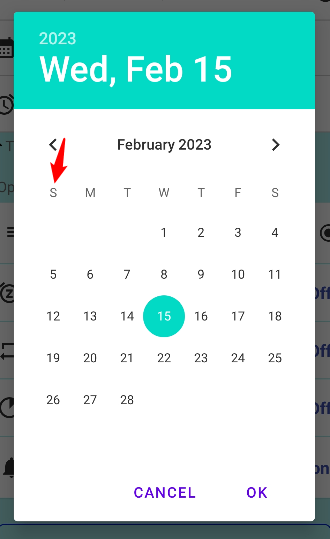
First day of the week on calender, what is this setting?
2023.02.15

On creating a reminder page, there is a date-picker calender.
You can select whick day comes first.

E.g. If you select “Sun”, then the red arrow day on the image becomes “Sun”.


X Facebook Hatena Bookmark LINE Pinterest
Celestial Brain -Mobile app developer-
Home

Reminder FLEX FAQ

Instant Blood Pressure Tracker FAQ


Reminder FLEX nagging you so you won't miss your tasks. Super easy yet flexible.

Recent Posts

  • How to Fix Incorrect or Missing Records in the Record List Using Recalculate Averages
  • Show note excerpts instead of icons in the All and Daily lists
  • Instant Blood Pressure Tracker Privacy Policy
  • Change Speed of Text-to-speech (Read too fast/slow)
  • Hide BP photos from the Gallery on Samsung Galaxy
Celestial Brain -Mobile app developer-
  • Contact us
© 2022 Celestial Brain -Mobile app developer-.