“Isn’t there an app that notifies me every hour?”
“During work, I often realize several hours have passed without taking a break.”
“I want an app that helps me manage my hourly routine without forgetting.”
Do you have these concerns?
This is where the Android app
Reminder FLEX becomes useful.
With Reminder FLEX,
you can receive hourly alerts using either notifications, alarms, or voice readout,
with a very simple setup.
Both setting up and stopping the reminders are very simple.
Even Android beginners or those who struggle with reminder apps
can use it without confusion.
Features of Reminder FLEX for Hourly Alerts
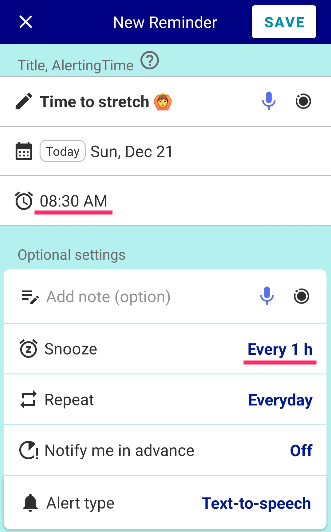
Setting the repeat option to “Every day,” “Weekdays,” etc., allows the reminder to ring every hour starting at the same time each day.
You can easily stop it whenever you don’t want any more alerts for the day
- Using “Stop snooze” prevents any further alerts for the rest of the day
- You can temporarily stop alerts during certain hours with “Pause” or “Mute all alerts”
This flexible ON/OFF control lets you adapt it to your schedule and mood.
Choose from 3 alert types: Notification, Alarm, or Voice Readout
- Notification: A short alert sound with a lock-screen message
- Alarm: A melody that rings at the set time
- Voice readout: Reads the reminder title aloud, such as “Let’s take a break”
You can choose the alert type for each reminder individually.
Alerts ring on time without delays
Reminder FLEX avoids delays caused by Android’s battery optimization and prevents the common issue of alerts arriving “10 minutes late,” ensuring alerts ring on time without even a 1-minute delay.
FAQ about Hourly Alerts
Q. Can I set intervals other than every hour, such as every 30 minutes?
A. Yes. You can set any interval you like — for example, every 1 minute, every 30 minutes, or every 2 hours — and choose how many times it repeats.
Q. Is it free to use?
Q. Can I set it to vibrate only every hour?
Q. Will it ring even when the screen is off?
Situations Where Hourly Reminders Are Useful
As a “1-hour break” reminder during work
During desk work or computer work,
you may find yourself sitting in the same position for hours without noticing.
・Stretch every hour
・Take a short break and drink water every hour
These habits are very helpful for health management.
For dividing household tasks or daily routines
For cooking, cleaning, studying, and other tasks,
it is ideal when you want to divide your routine into smaller time blocks.
It is useful for time management such as
“Move to the next task after 1 hour.”
To prevent overdoing games or focused activities
For games, reading, or watching videos,
it helps when you tend to lose track of time because you concentrate too much.
By receiving a gentle alert every hour,
you can stop yourself before spending too much time on a single activity.
If You Want Reliable Hourly Alerts
With Reminder FLEX,
you can choose from notifications, alarms, or voice readout for hourly alerts,
and receive them reliably every hour as scheduled.
If you want an app that reliably alerts you every hour,
this is the perfect reminder app for you.