“I still forget things even when I use alarms or reminders with 1 or 2 notifications.”
“Isn’t there an app that notifies me more than 10 times with snooze?”
“Is there an app that reminds me regularly, like every 1 hour?”
There are many calendar, alarm, and reminder apps for Android.
However, most of them only offer
“1 or 2 notifications at the scheduled time, and that’s it.”
If you are frustrated by this, you are not alone.
That is where a regularly re-notifying Android reminder app with snooze becomes useful.
Introducing Reminder FLEX, an Android reminder app designed to notify you repeatedly.
Features of Reminder FLEX That Re-Notify on the Lock Screen with Snooze
The snooze feature in Reminder FLEX is not just an extension of normal notifications.
It is designed for people who tend to forget, allowing flexible and repeated re-notifications.
- Set how often to re-notify freely, such as every 1 minute, 5 minutes, 15 minutes, 30 minutes, or 1 hour (up to a maximum range of 20 hours)
- Specify how many times snooze repeats (up to 90 times within the 20-hour limit)
- Even reminders set without snooze can be re-notified easily using 1-tap snooze, such as re-notifying after 15 minutes
- Combine with the repeat feature to create settings like “Every day from 10:00, snooze 10 times every 5 minutes”
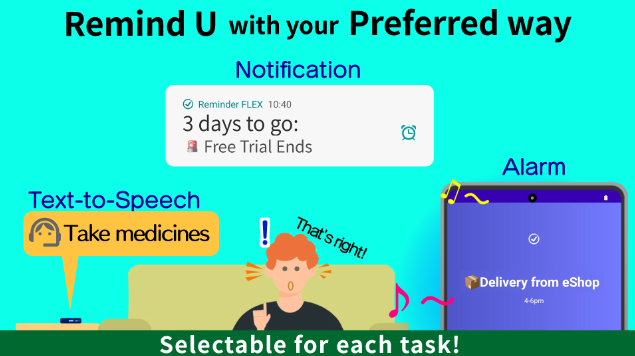
- Combine with countdown advance notifications to get notified days before the event and repeatedly on the day itself
- Notification methods include not only notifications, but also voice alerts and alarms
If you want repeated, persistent, and relentless reminders,
Reminder FLEX is built for exactly that.
Frequently Asked Questions About Snooze
Q. Can notifications keep repeating until I stop snooze?
A: Each reminder can repeat snooze notifications up to 90 times within a 20-hour range.
For example, you can set:
- Re-notify every 1 hour, 10 times
- Re-notify every 15 minutes, 30 times
- Re-notify every 1 minute, 60 times
You can stop snooze at any time by tapping the stop button.
There is also a way to use snooze without deciding the number of repeats in advance.
If you set a reminder without snooze, you can simply tap
“Re-notify in 15 minutes”
each time the notification appears.
This allows the reminder to keep notifying you until the task is completed.
(The re-notify interval can be changed.)
Use Case Examples for Snooze
Prevent forgetting to take medicine with nagging notifications
If you take medicine at a fixed time every day, you can prevent forgetting by setting such as:
- A notification every day at 8:00
- Repeated snooze every 5 minutes
- Voice alerts saying “It’s time to take your medicine,” making it easier to notice even during meals
Repeated reminders for tasks that must be done during the day
For tasks like bank transfers or document submissions that must be completed the same day, Reminder FLEX is especially useful.
• Snooze every 1 hour, 10 times
This keeps notifications appearing on the lock screen, helping you remember and complete the task during the day.
Re-notify every 1 minute to avoid burning food while cooking
You can set a reminder 5 minutes after starting to cook, then snooze it every 1 minute for 15 times.
After the first alert, it will keep notifying you every minute.
“Setting this every time is annoying,”
In that case, you can register it using Quick Set and apply the pattern instantly.
1-tap re-notify when your hands are busy
When a reminder like “Call the city office” goes off but you are busy, simply tap the
1-tap re-notify button to be reminded again after 15 minutes or another preset interval.
A Persistent Reminder App for People Who Forget Easily
Reminder FLEX is not a “notify once and done” app.
Until you notice
Until you finish
Until you stop it
It keeps notifying you repeatedly, protecting the schedules you really do not want to forget.
If you often feel
“I didn’t notice the notification”
“I checked it but still forgot”
Then give Reminder FLEX a try.